Why Ө and Ү look off on your website
While building this blog I noticed something odd. Most of the Mongolian text looked fine, but Ө and Ү looked slightly different from the letters around them: a bit narrower, a bit thinner, sitting at a slightly different height. Nothing was technically broken, so it was easy to miss.
With a sans-serif font the difference is subtle, so here is the same effect with a serif font (Noto Serif), where it is easy to see. Same font file, same text, loaded two different ways:
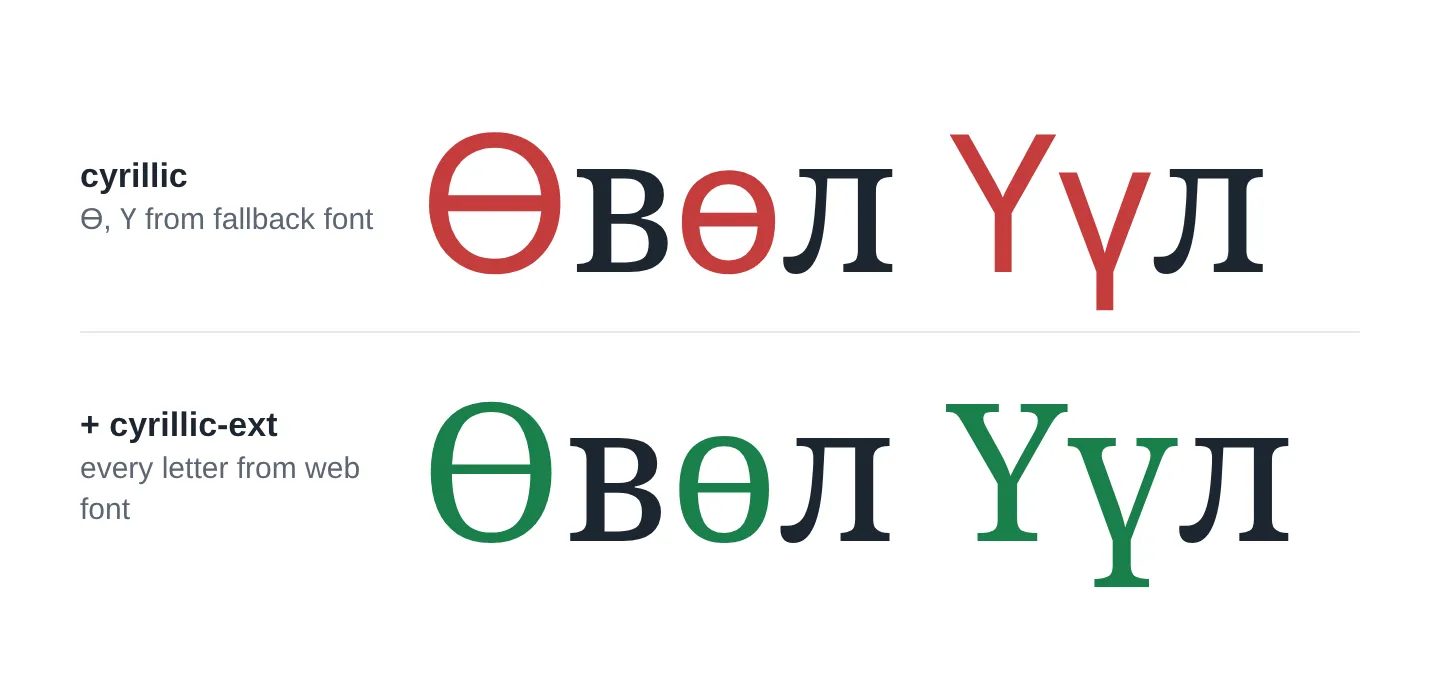
In the top row, the red Ө and Ү have no serifs. They come from the system fallback font (here an Arial look-alike), not from the web font. With a sans-serif web font the mismatch is smaller, but it is still there: different width, stroke and height.
Why it happens
Web fonts are usually split into subsets, smaller files that each cover one range of characters. Google Fonts, Fontsource and most font tools do this so a page only downloads the characters it actually uses.
The Cyrillic alphabet is split into two subsets:
| Subset | Unicode range (simplified) | Contains |
|---|---|---|
cyrillic | U+0400–045F, U+0490–0491, U+04B0–04B1 | Russian alphabet, Ё, Ъ, Ukrainian Ґ, Kazakh Ұ |
cyrillic-ext | U+0460–052F | Ө ө (U+04E8, U+04E9), Ү ү (U+04AE, U+04AF), and other letters |
Mongolian uses the Russian alphabet plus two extra letters, Ө and Ү, and both of them live in cyrillic-ext. Interestingly, the basic subset does include the Kazakh letter Ұ (U+04B0), right next to Ү (U+04AE), but not Ү itself.
So if you load only cyrillic, 33 of the 35 Mongolian letters come from your web font, and the other two do not.
What the browser does
Each @font-face rule has a unicode-range. For every character, the browser looks for a font file whose range includes it:
flowchart TD
  A[Character Ө, U+04E8] --> B{Is it in the unicode-range of a web font file?}
  B -- yes --> C[Download that file and use it]
  B -- no --> D[Try the next font in font-family]
  D --> E[System fallback font, e.g. Arial, Segoe UI, DejaVu Sans]
This happens per character, not per word. That is why only Ө and Ү look different while the rest of the word stays in your font.
The fix
The rule, whatever your stack: some @font-face rule for your font must cover U+04AE–04AF (Ү ү) and U+04E8–04E9 (Ө ө). In practice that means loading the cyrillic-ext subset next to cyrillic, or using a font file that contains those letters without a unicode-range that excludes them.
Plain CSS (self-hosted fonts)
If you host the font files yourself, add an @font-face rule for the extended file too:
@font-face {
	font-family: 'MyFont';
	src: url('/fonts/myfont-cyrillic.woff2') format('woff2');
	unicode-range: U+0400-045F, U+0490-0491, U+04B0-04B1, U+2116;
}
@font-face {
	font-family: 'MyFont';
	src: url('/fonts/myfont-cyrillic-ext.woff2') format('woff2');
	unicode-range: U+0460-052F;
}
If you use a single full font file, you can leave out unicode-range entirely. Then the browser uses that file for every character it contains.
Tools with a “subsets” option
Many tools ask which subsets you want. Wherever you see cyrillic, add cyrillic-ext next to it:
| Tool | Where |
|---|---|
| Fontsource (subset files) | also import @fontsource/<font>/cyrillic-ext-400.css |
Next.js next/font | subsets: ['latin', 'cyrillic', 'cyrillic-ext'] |
| Astro Fonts API | subsets: ['latin', 'cyrillic', 'cyrillic-ext'] |
| Font download sites and helpers | tick Cyrillic Extended as well as Cyrillic |
Google Fonts link
The current CSS API (fonts.googleapis.com/css2?...) returns every subset the font has, each with its own unicode-range, so the browser picks up cyrillic-ext automatically. Problems usually start when you copy only some of those rules into your own CSS, or when the font has no extended subset at all. If you still use the old API with a &subset= parameter, add cyrillic-ext there.
Make your own Mongolian subset
cyrillic-ext also contains letters for many other languages, so it is bigger than Mongolian needs. If file size matters, you can cut a font down to exactly the characters you use with fonttools:
pip install fonttools brotli
pyftsubset MyFont.ttf \
  --unicodes="U+0000-00FF,U+0400-045F,U+04AE-04AF,U+04E8-04E9,U+2116" \
  --flavor=woff2 --output-file=myfont-mn.woff2
That gives you one small file with Latin, the Russian alphabet, Ө and Ү. For Noto Serif, this cut the file from 712 KB (full TTF) to 25 KB.
Tip
Before choosing a font for a Mongolian site, check that it supports Cyrillic Extended, not just Cyrillic. Some popular fonts support only Latin, and some support Cyrillic but not the extended letters.
How to check your own site
- Open the page in Chrome or Edge and right-click a word with Ө or Ү → Inspect.
- In the Computed tab, scroll to the bottom and look at Rendered Fonts.
- If you see your web font and a system font (for example
Arial — 2 glyphs), some characters fell back.
Firefox shows the same information in the Fonts panel of the inspector.
You can also open your site’s CSS and look for a unicode-range that includes U+0460-052F. If no @font-face rule covers that range, Ө and Ү are not coming from your web font.
Summary
- Mongolian needs two Cyrillic subsets:
cyrillicandcyrillic-ext. - Ө and Ү live in
cyrillic-ext. Without it, the browser silently uses a fallback font for those letters. - Make sure some
@font-facecovers Ө and Ү: addcyrillic-extwherever you configure subsets, then check Rendered Fonts in DevTools to confirm.